Lower prices that apply by themselves
In short
- Give a rental price a promo price for a period, such as a winter rate from 1 November to 31 March.
- Add a tiered discount per product: a percentage off from a number of units or from a number of rental days.
- Customers see the regular price struck through and the discount as a line of its own, from product page to invoice.

Why promotions and discounts matter
A lower price for the quiet season or for big orders fills your calendar, as long as it applies by itself. No codes to hand out, no invoices to correct afterwards.
Promo price per rental price
Set a lower price for a day, a week or any option, with a start and end date. It switches on and off by itself.
Discount for more units or days
From 5 units 10% off, from 3 days 15% off: you choose the tiers, the shop does the maths.
Clear for the customer
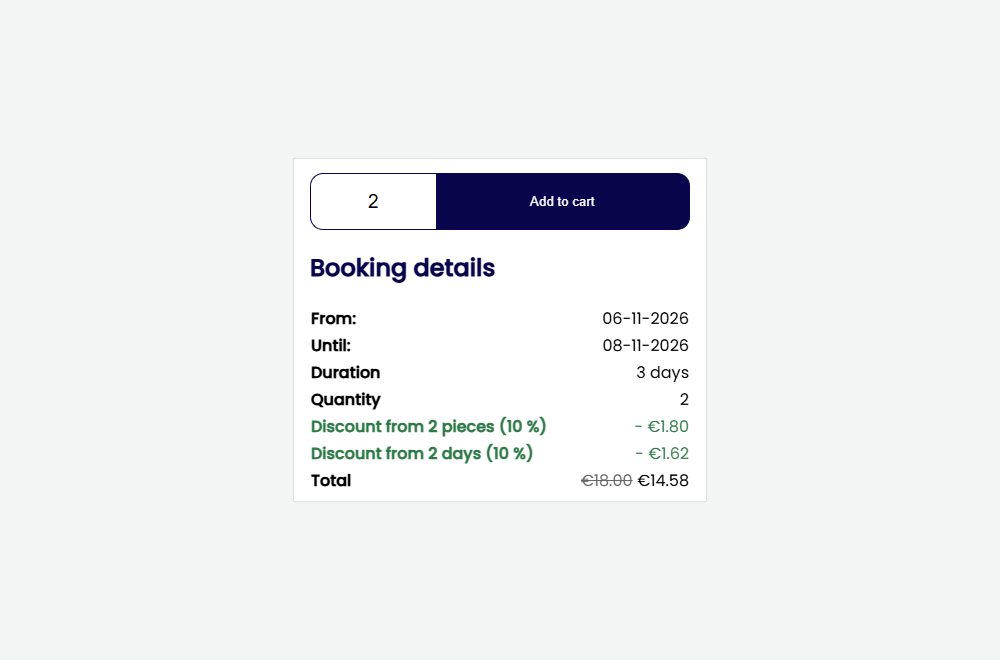
The regular price is struck through and the discount is a line of its own, on the product page, in the cart, in the mail and on the invoice.
How Be-Bookable solves it
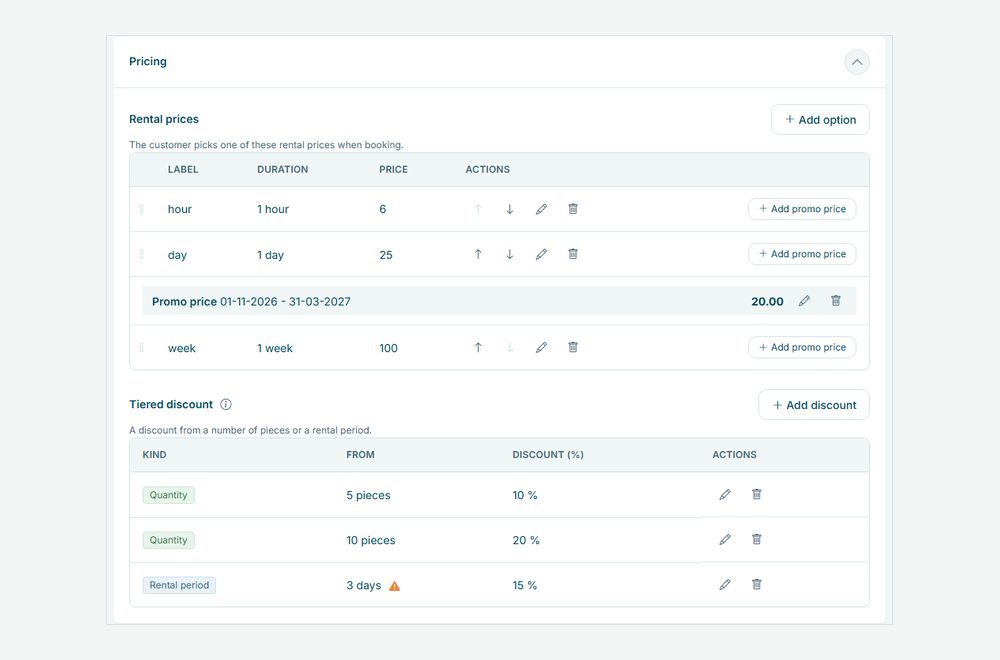
- Add a promo price. Open a product, go to Prices and click Add promo price under a rental price. Enter the price and the period. Outside that period the regular price applies again.
- Add discount tiers. Under Tiered discount, click Add discount. Choose Quantity or Rental period, the number of units or days it starts from, and a whole percentage. Add as many tiers as you need; per kind the highest tier reached applies.
- Check the warning. Does a fixed multi-day rental price, such as a weekend, fall under a period tier? The product shows what a customer pays then, so you can adjust the tier or the price.
- Customers see it when they book. The product page lists the tiers under the price and lights up the ones reached once quantity and dates are chosen. The cart, the confirmation email and the invoice show the discount as its own line, see invoice generation.
Promotions and discounts in the real world
A few ways rental businesses use them:
| Rental type | Promo price | Tiered discount |
|---|---|---|
| Bike rental | Winter rate per day, November to March | 10% from 3 days |
| Party rental | None | 10% from 10 chairs, 20% from 50 |
| Camera rental | Summer rate on the weekly price | 15% from 7 days |
| Silent disco | None | 10% from 20 headphone sets |
See it in action
The booking details with the discount lines, and the Prices panel of a product with a promo price and the tiers.
Frequently Asked Questions
Do the discounts stack?
Yes, in a fixed order. First the quantity discount on the line price, then the period discount on the result: 10% and 10% make 19%, not 20%. Per kind only the highest tier reached applies.
Does a tiered discount also apply to a promo price?
Yes. The tiers work on the price that applies at that moment: the promo price in its period, the regular price outside it.
What if I change a tier later?
Existing orders keep the discount they were booked with. New bookings use the new tiers straight away.
Can customers enter a discount code?
Not yet. Promo prices and tiered discounts apply by themselves, so there is nothing to type at checkout. Discount codes are on our list.