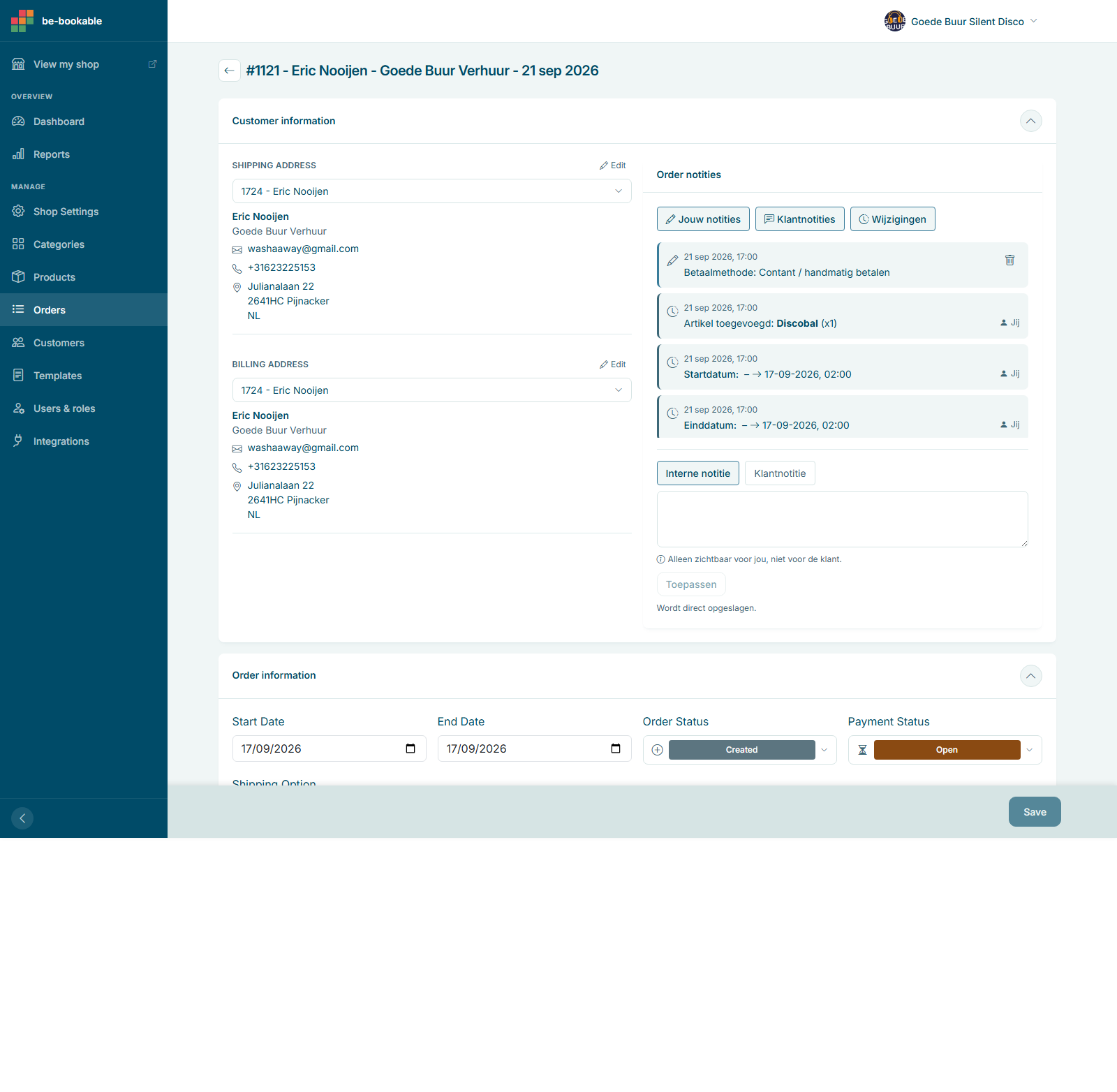


Order management is about how you track, update, and fulfill your rental bookings. It gives you a clear view of every order (past, present, or upcoming) along with tools to edit details, monitor payment status, and communicate internally. Whether you’re managing a single booking or a busy season, order management keeps everything organized and up to date.
Why this feature matters
- Gives you full control over bookings, even after confirmation.
- Helps track customer details, rental periods, and payment status in one place.
- Supports changes without the need to cancel or restart an order.
- Improves team coordination with notes and a full change history.
- Lets you view your workload the way that fits you: a table for quick edits, a calendar for planning, or a workflow board to see what needs attention.
How Be‑Bookable solves it
- Switch between Table, Calendar, and Workflow views on the Orders page.
- Open any order to adjust product quantities, rental periods, prices, or shipping details.
- Change the order status at any time: Created, Pending, On Hold, Reserved, Prepare Shipment, Awaiting Delivery, At Customer, Completed, Cancelled, Returned, or Awaiting Return.
- Track payments live, or mark them manually for offline or cash payments.
- Add internal notes only your team sees, or customer notes tied to the order.
- See a full timeline of every change on the order: status updates, added items, payment method, and dates, each with a timestamp and who made it.
- Create a shipping label straight from the order and pick from your carrier’s service options.
- Send a quote directly from an order before the customer commits.
Real‑world use cases
- Party rental: Adjust quantities when a client increases guest count after booking.
- Tool rental: Extend a rental period when a customer needs more time on the job.
- Vehicle rental: Update an address or payment method without restarting the order.
Check out order management in the Be‑Bookable demo and see how easy it is to stay on top of every rental.
Frequently Asked Questions
Can I edit an order after it’s been placed?
Yes. You can update quantities, products, rental dates, or shipping details at any stage, from Created through Completed.
Can I mark a payment as received manually?
Yes. You can update the payment status manually for offline or direct payments.
Can I cancel an order?
Yes, at any time, by changing its status to Cancelled. There’s no separate delete action, so cancelled orders stay in your order history for your records.
Can I add internal notes to an order?
Yes. Add internal notes only your team can see, or customer notes tied to the order. Every note and status change is saved in the order’s timeline.
Can I create a shipping label without leaving the order?
Yes. Pick your carrier’s service option directly on the order and generate the label there, no separate shipping tool needed.
Can I see my orders in a calendar or workflow view, not just a list?
Yes. The Orders page has three views, Table, Calendar, and Workflow, so you can switch to whichever fits how you’re planning that day.