Record what goes out and what comes back
In short
- Record on your phone what the customer takes and brings back: the items, any damage, photos and the customer’s signature.
- Every handover and return becomes a PDF receipt on the order. The customer gets it by email when you choose so.
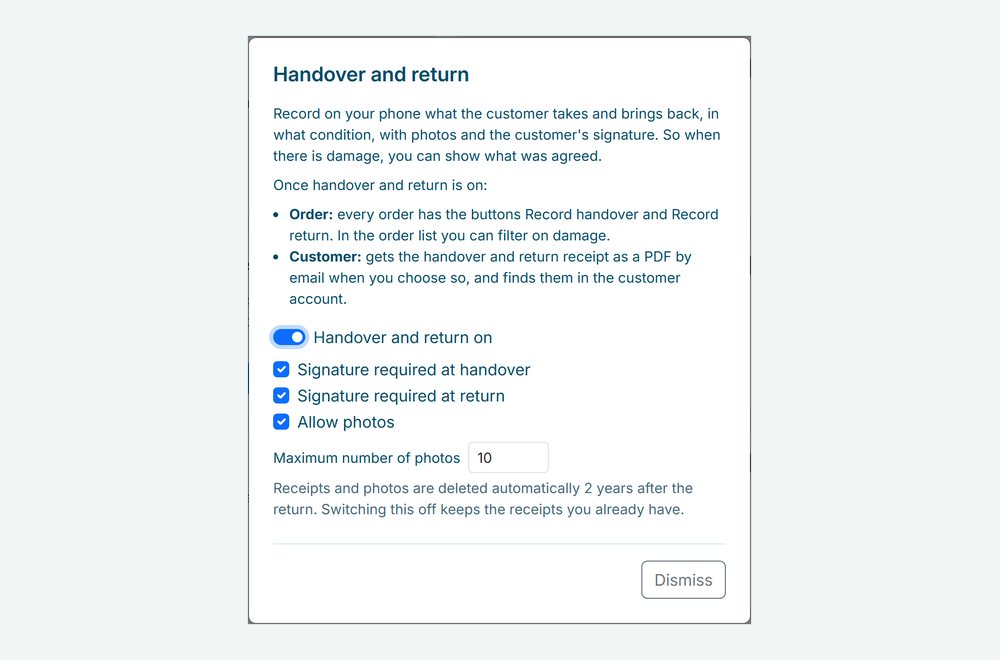
- Switch it on under Integrations and choose when a signature is required and how many photos you allow.

Why handover and return records matter
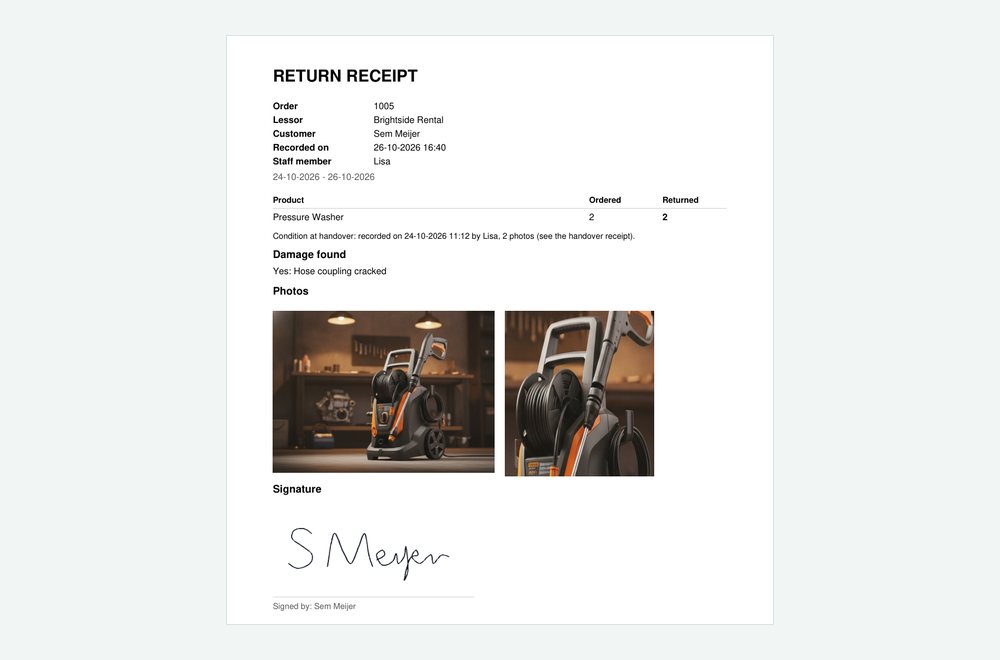
When something comes back damaged, it is your word against the customer’s. A receipt with photos and a signature shows what went out, what came back and in what condition.
Photos and a signature
Take photos with the phone camera and let the customer sign on the screen with a finger. You choose when a signature is required.
Damage on record
At the return, tick Damage found and describe it. The order gets a Damage label, and you can filter your order list on it.
A receipt for both of you
The handover and return receipts are PDFs with the items, remarks, photos and signature, kept with the order.
How Be-Bookable solves it
- Switch it on. Go to Integrations, open Handover and return and switch it on. Choose whether a signature is required at handover and at return, and whether photos are allowed and how many, up to 20.
- Record the handover. Open the order and tap Record handover. Tick what goes out, or tap Tick all, add remarks and photos, and let the customer sign.
- Record the return. Tap Record return and tick what came back. Found damage? Tick Damage found and describe it. The return receipt also mentions how the items were at handover.
- Choose who gets the receipt. When you save, you choose whether the customer gets the receipt by email. It is on the order either way, and customers with an account find it there too, see customer accounts.
Handover and return in the real world
What rental businesses record:
| Rental type | At handover | At return |
|---|---|---|
| Bike rental | A photo of the frame and the lock, and a signature | A scratch or a flat tyre, with a photo |
| Tool rental | The machine and its accessories ticked off | A missing accessory or damage, on record |
| Party rental | The number of tables and chairs counted | Fewer chairs back, or a torn cover |
| Camera rental | The serial number and the condition of the lens in the remarks | A signature that everything came back |
Frequently Asked Questions
Does the customer have to sign?
Only when you want that. You choose whether a signature is required at handover and at return. Without a signature, the receipt says it was not signed.
How long are receipts and photos kept?
Two years after the return, then they are deleted automatically. When you switch the feature off, the receipts you already have stay.
What if the connection drops while saving?
The screen keeps what you entered and sends it again as soon as you are back online. Photos are made smaller on the phone first, so they go up quickly.
Does recording change the order status?
No. Recording a handover or a return is separate from the order status. You change the status as before.