
Build your own rental shop on the Be-Bookable API
In short
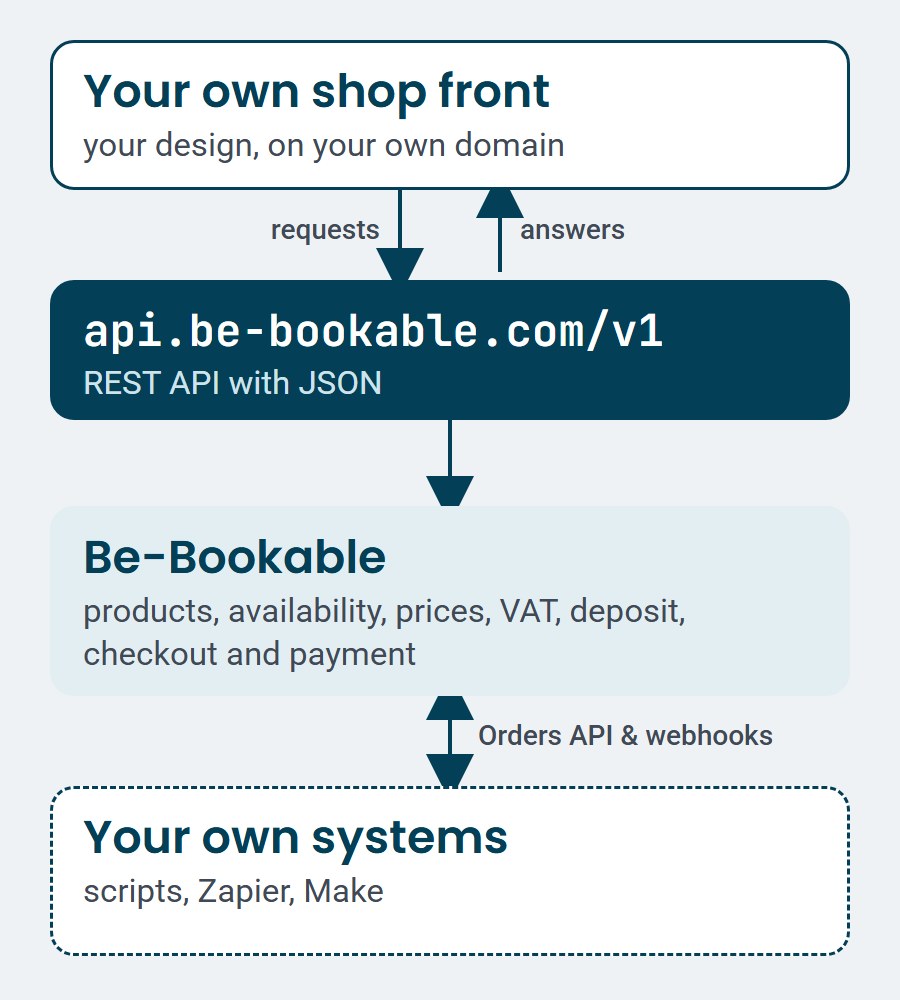
- Your developer builds your own web shop or booking flow, in your own design. Be-Bookable supplies the products, availability, prices and checkout.
- Your own systems read your orders with an API token, and webhooks tell them when an order is placed, paid or changes status.
- The API is in every Be-Bookable plan, at no extra cost. Your developer builds and tests on a sandbox with test payments.
Why build on the Be-Bookable API
With two lines of code, the website widget puts a ready-made rental shop on your site. Some rental businesses want more: a booking flow in their own design, or orders that go straight into their own systems. With the API your developer builds exactly that, and Be-Bookable keeps doing the hard part: availability, prices, VAT, deposits and payment.
We calculate, you design
Availability, prices, VAT, shipping, deposit and payment come from Be-Bookable. Your shop front only shows the results, so it always matches your stock and prices.
Orders in your own systems
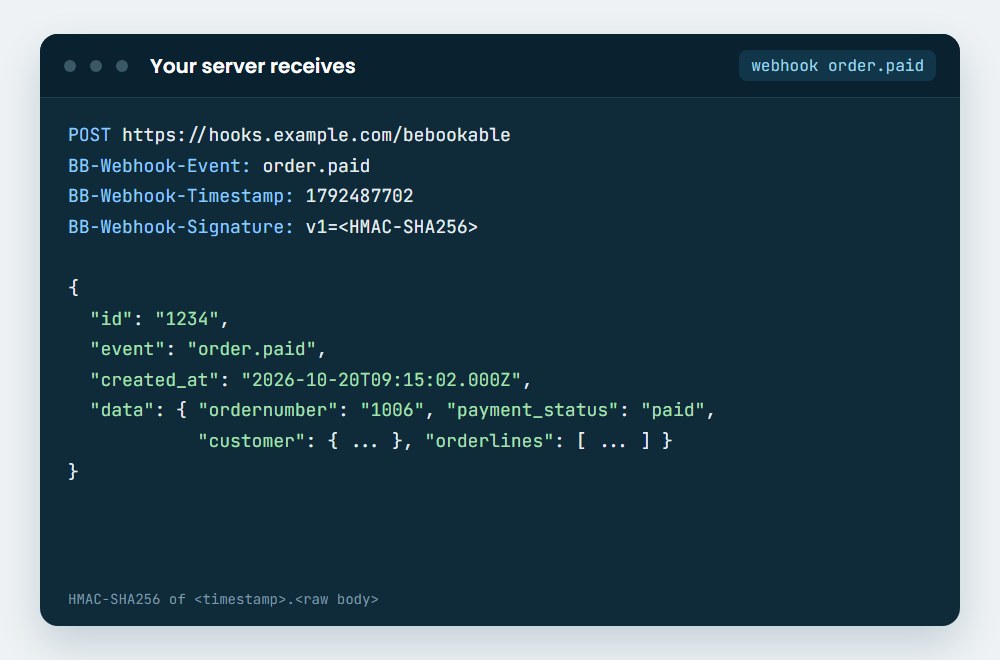
A script, Zapier or Make reads your orders with an API token, customer details included. Webhooks send a signed message when an order is placed, paid or changes status.
Safe to build and test
Your developer builds on a sandbox with test payments, next to a working example shop. Version 1 only adds things, so your shop keeps working when the API grows.
How to build your own shop on the API
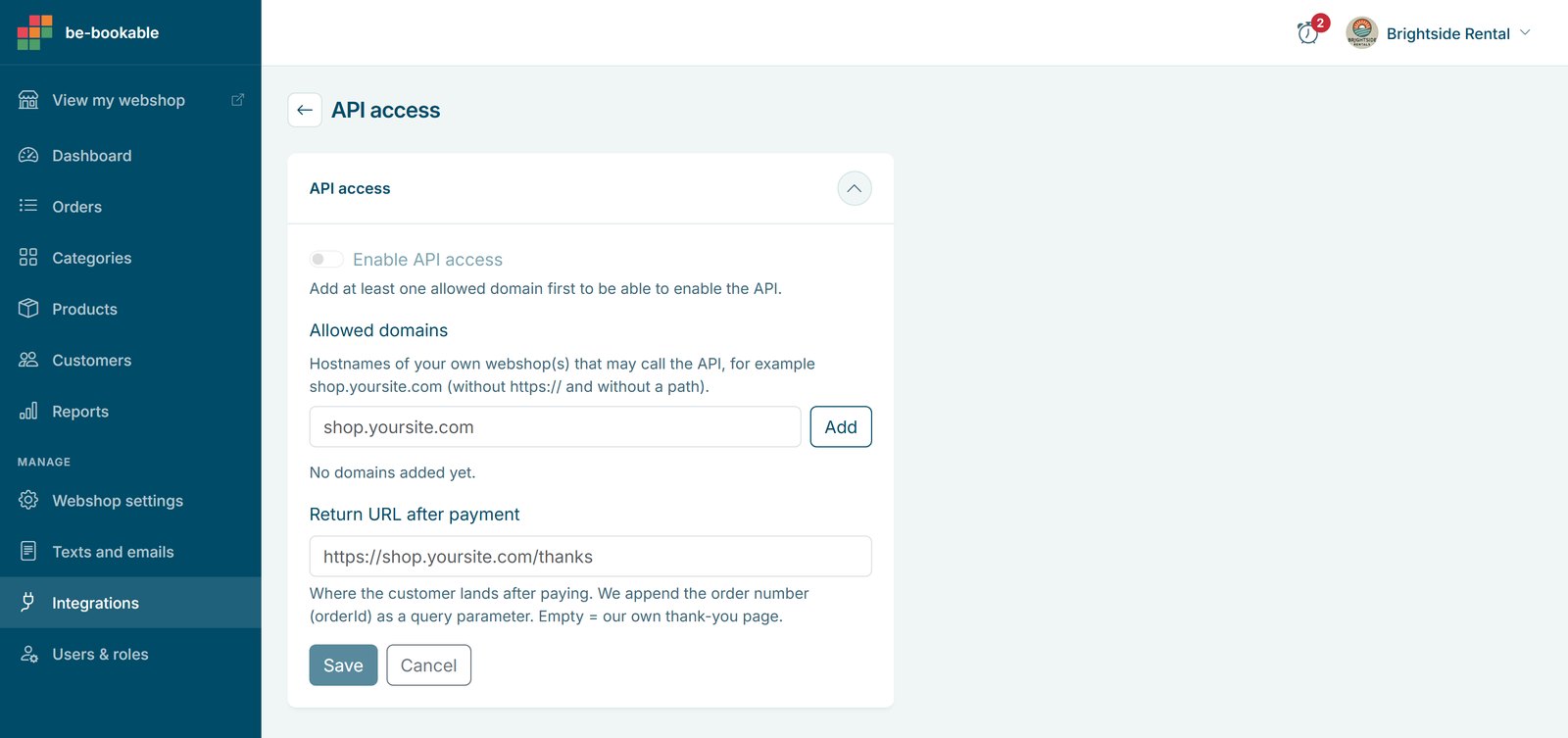
- Switch on API access. In the Be-Bookable app, go to Integrations and open the card API access. Add the domain of your own shop, for example
shop.example.com, and the return URL for after the payment. Then switch it on. - Build on the sandbox. Your developer starts with the guide Build your own shop, which comes with a working example shop. The sandbox at
https://test.api.be-bookable.com/v1accepts test payments and has a test shop, so every step can be tried without real orders. - Let Be-Bookable do the booking. Your shop front shows the catalog, checks availability and asks Be-Bookable for the total. It then creates the order and sends the customer to the payment page. After the payment the customer lands on your return URL.
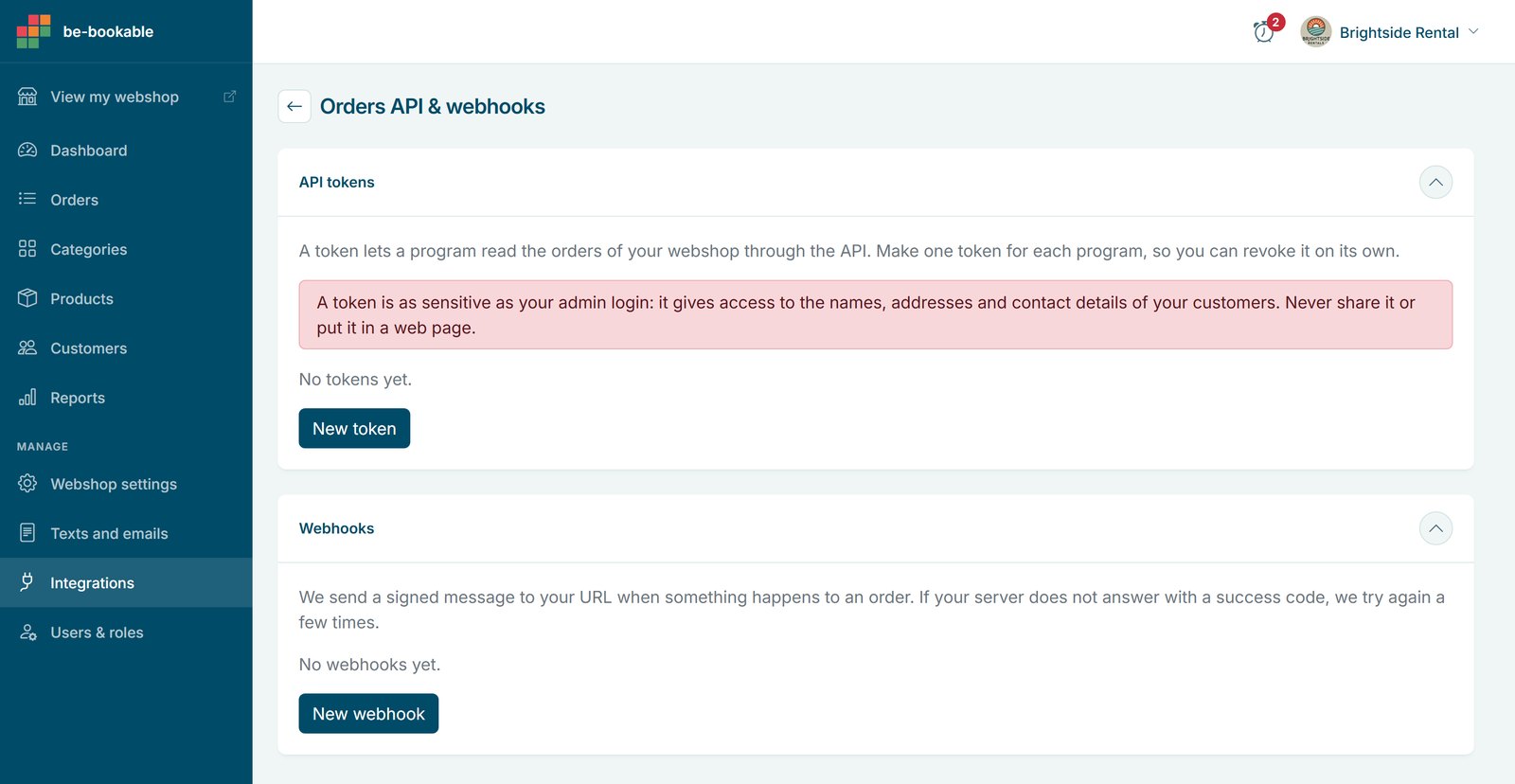
- Connect your own systems. Open the card Orders API & webhooks. Make an API token for each program and add the URL of your webhook. Send test event shows at once if your server gets the message. Only the owner of the shop can do this.
- Go live. Register the domain of your live shop, change the base URL to
https://api.be-bookable.com/v1and place one real order through the complete flow.
What the API covers
The requests in the order a customer uses them:
The id of the shop, its colours, logo, country, timezone, shipping options and closure days
GET /partners/{slug}The categories and products of your shop, with images, prices, variants and order limits
GET /partners/{id}/categoriesGET /categories/{id}/productsGET /products/{id}The opening hours, and the terms and conditions or privacy policy for the checkout
GET /opening-hours/{id}GET /partners/{id}/pages/{type}The free products in a period, a calendar or time slots for one product, or a check of one period and quantity
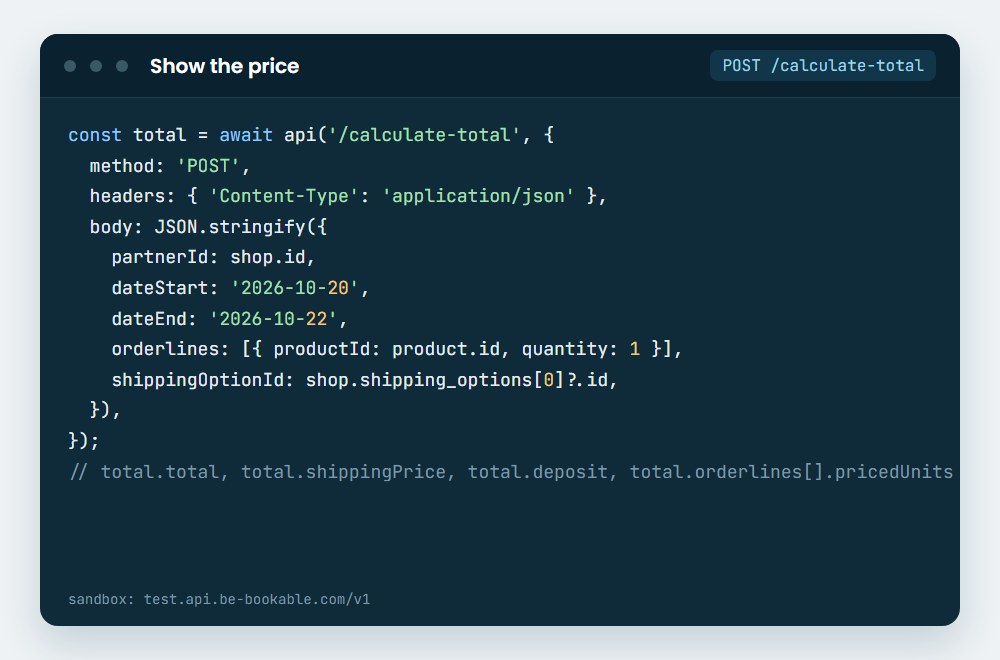
GET /available-productsGET /check-availability-for-periodGET /check-availabilityThe total with VAT, shipping, deposit and discounts
POST /calculate-totalThe payment methods of the shop, then the order and a link to the payment page
GET /payment-methods/{id}POST /create-orderThe order number and the payment status for your thank-you page
GET /order/{orderId}Your orders with customer details, with an API token
GET /ordersGET /orders/{orderId}Access, limits and webhooks
- Shop front: no token. Your shop sends its requests from the browser, on the domains you registered. The order that your shop reads back has no personal data of your customers.
- Orders API: an API token in the
Authorizationheader, from your server only. It reads the same orders that you see in order management, with customer details. A shop can have 10 tokens, and you revoke each one on its own. - Webhooks: three events, signed with HMAC-SHA256:
order.created,order.paid,order.status_changed. When your server does not answer, we try again after 1 minute, 5 minutes, 30 minutes, 2 hours and 12 hours. The delivery log keeps each message for 30 days. - Limits: 120 reads and 10 writes per minute for each IP address, and 600 requests per minute for each token. An answer 429 says in Retry-After when to try again.
- Versions: version 1 only adds things, such as new fields or endpoints. Every change is in the API changelog.
See it in action
A real request from the guide: your shop asks for the total of a cart and Be-Bookable calculates it. Then the message that your server gets when an order is paid.
Frequently Asked Questions
Does the API cost extra?
No. The API is in every Be-Bookable plan, see pricing. You only pay your own developer or agency for the work on your shop.
Do I need a developer?
Yes. The API is for someone who writes code, such as your own developer or a web agency. Do you want a rental shop on your site without code? Then use the website widget.
What is the difference with the website widget?
The website widget is a ready-made rental shop that you place on your site with two lines of code. With the API your developer builds the shop front, so the design and the booking flow are fully your own. Behind both are the same products, availability, prices and orders in Be-Bookable.
What is the difference with the AI assistant?
The AI assistant is for you: you ask Claude or ChatGPT about your shop and let it change prices, stock or opening hours, without code. The API is for the software that your developer builds: a shop front for your customers and links to your own systems.
Can we test without real orders?
Yes. The sandbox at https://test.api.be-bookable.com/v1 accepts test payments, and the example shop shows a complete order on it. For webhooks, Send test event in the app sends a test message to your server, signed with your real secret.
Which webhooks are there?
Three: order.created when an order is placed, order.paid when the payment is confirmed, and order.status_changed when the status of an order changes. Each message is signed, so your server can check that it comes from Be-Bookable. Zapier and Make can receive them too.
Are there rate limits?
Yes. For each IP address: 120 reads and 10 writes per minute, with a maximum of 10 orders per minute. For each API token: 600 requests per minute. The headers of each answer show how many requests are left.
Can my developer see the data of my customers?
Only with an API token. The requests of your shop front never give the personal data of your customers. An API token reads your orders with customer details, and only the owner of the shop can make one. A token that you revoke stops working at once.
Where is the documentation?
Everything is on developers.be-bookable.com: the guide Build your own shop, the full reference of every request, the example shop and the changelog.