Home / Features / Shop personalisation
A shop front representing a personalized shop

Shop personalisation

Give your rental shop your own logo, colours and welcome text, online right after you sign up and without any code.

A rental shop in your own colours, online from day one

In short

  • Add your logo, your two brand colours and a welcome text.
  • Your shop is online at shop.be-bookable.com/your-company-name right after you sign up.
  • No hosting or code: every change shows as soon as you save.
Shop personalisation
The same shop with three different colour choices.

Why shop personalisation matters

Customers book with more trust when the shop looks like your business. Your logo and colours show that at first sight.

Recognisable

Your logo sits in the header and in the browser tab, in your own colours.

A warm welcome

A short text on the home page tells customers who you are and how booking works.

In your customers’ language

Your shop appears in Dutch, English or German, based on your business country.

How Be-Bookable solves it

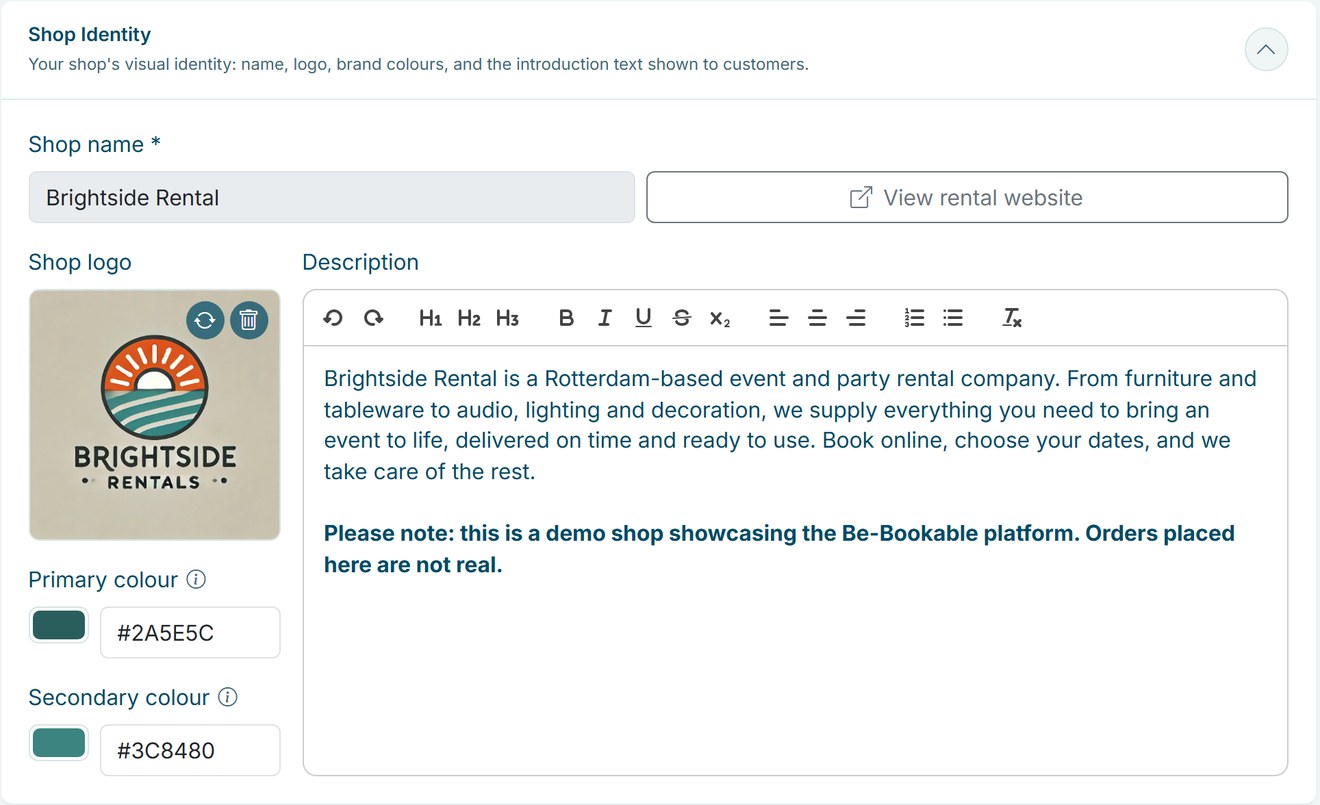
  1. Open Shop Settings. Under Shop Identity you find your shop name, logo, colours and description.
  2. Add your logo. Upload your logo. It appears in the header of your shop and as the icon in the browser tab.
  3. Choose your colours. Pick a primary and a secondary colour with the colour picker or enter a hex code. The primary colour fills the header and the buttons, the secondary colour is used for highlights.
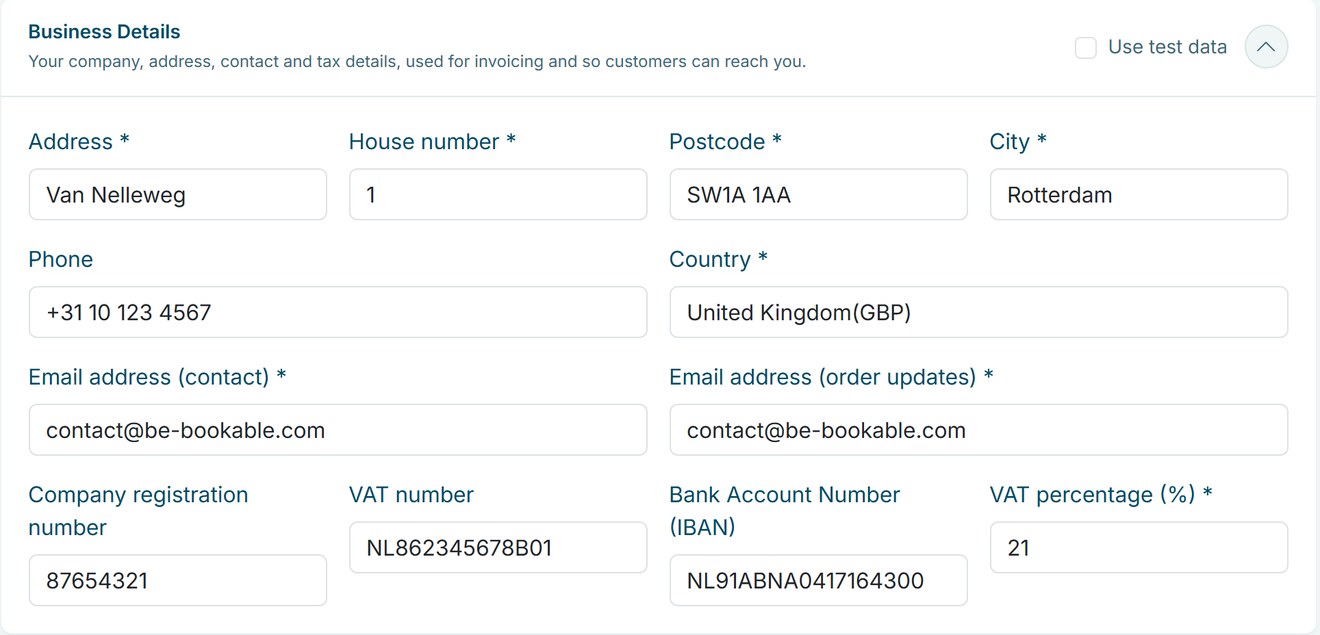
  4. Write your welcome. The description appears at the top of the home page of your shop, above your categories. Under Business Details you add your address, contact email and VAT percentage.

Shop personalisation in the real world

A few examples of how rental businesses make the shop their own:

Rental typeLookWelcome text about
Party rentalBright colours and a festive logoWhat you can rent for a party and how delivery works
Tool rentalDark, sturdy coloursOpening hours and pickup at the depot
Bike rentalFresh greenWhere to pick up the bikes and what is included
Camping gearEarthy tonesHow to pack and return the gear
Event equipmentYour company coloursDelivery, setup and who to contact

See it in action

Your logo, colours and description in Shop Settings, with your business details right below.

Frequently Asked Questions

Can I use my own domain name?

Not as the address of your shop. Your shop runs at shop.be-bookable.com/your-company-name. You can also place it on your own website with the website widget.

Your shop name is the company name you signed up with, and the web address is based on it. Get in touch with us if your company name changes.

Yes. Your shop is online as soon as you sign up, with an example category and an example product. Replace them with your own range before you share the link.

No. You choose your logo, two colours and the welcome text. The layout and fonts are the same for every shop, so it works well on any screen.

Other Features

A calendar with a cross icon representing a booking block

Booking blocks

Hold prep, cleaning or transport time before and after every rental, set per product.

Bundles

Combine products into one bookable set with its own price, while stock stays correct for every item.

A set of icons representing category management

Category management

Group your products into categories with a photo and description, so customers find what they need faster.

Custom language settings

Your shop appears in Dutch, English or German based on your business country, and your team picks English or Dutch for the dashboard.

Custom shipping options truck

Custom shipping options

Set your own pickup and delivery options, each with a fixed price, and let customers choose at checkout.

An enveloppe representing a customer email

Customer emails

Send customers an email at every order status, in your own words, with the order summary added for you.

A card representing a customer page

Customer pages

Your terms, privacy policy and thank-you page, shown at checkout and after every booking.

Deposits

Ask a deposit per shop or per product, collect it as a card hold, online or at pickup, and settle it from the order.

Flexible booking slots

Rent out any product by the minute, hour, day or week, each with its own flat price and automatic buffer times.

Invoice generation

Every order gets a PDF invoice in your shop’s language, attached to the order emails.

Mobile app

Add Be-Bookable to your phone and get a notification for every new order and payment.

Opening & closing times

Set opening hours per weekday and closure periods for holidays, so customers only book pickups and returns when you are open.

A screen representing order management

Order management

Manage every rental order in a table, a calendar or a workflow board, and change dates, products and status as plans change.

a squared box representing product management

Product management

Manage every rental item in one place, with photos, rental prices from minutes to weeks, stock and booking rules.

Quotes

Turn a prepared order into a quote by email, with your own text and the full order summary.

Recommended accessories icon

Recommend accessories

Suggest the right accessories on every product page, optional or required, so customers book a complete set in one go.

Configure your own rental software for
Event Equipment. Tools. Office Furniture. Electronics. Gadgets. Party Supplies. Fitness Equipment. Costumes. Outdoor Gear. Baby Gear. Photography. Home Appliances. Medical Equipment. Garden Equipment. Audio Equipment. Kitchen Appliances. Water Sports Gear. Virtual Reality.  Camping Gear. Board Games. Musical Instruments. DIY Tools. Sports Equipment. Projectors. Camping Tents. Power Tools. Luxury Watches. Educational Toys. Party Tents. Office Technology. Tailoring Equipment. Karaoke Systems. Beach Equipment. Pop-up Shops. Massage Chairs. Ski Gear. Fishing Equipment. Project Tools. 3D Printers. Robotics Kits. Air Purifiers. E-bikes. Gaming Consoles. VR Headsets. Learning Kits. Silent disco.