Know which unit is with which customer
In short
- Give every physical unit its own barcode: a QR code with a short readable code, printed as labels or exported as a file for a print shop.
- Scan units at hand-out and return with your phone camera or a barcode scanner, straight on the order.
- The stock follows the number of units, and a unit can only be out on one order at a time.

Why barcode scanning matters
Identical items get mixed up: which e-bike came back damaged, and which one is still out? With a barcode per unit you see it on the order, without lists on paper.
A barcode per unit
Each unit gets a unique code, with a name if you like. Print the labels on A4 or order them from a print shop.
Scan at hand-out and return
Use your phone camera or a barcode scanner. A counter shows what is out and what is back.
Stock that counts itself
Add or remove units and the stock follows. Switch it off and everything is kept.
How Be-Bookable solves it
- Switch it on. Under Integrations, open Be-Checked and switch it on. Only the owner of the shop can do this. From then on, products and orders show the barcode blocks.
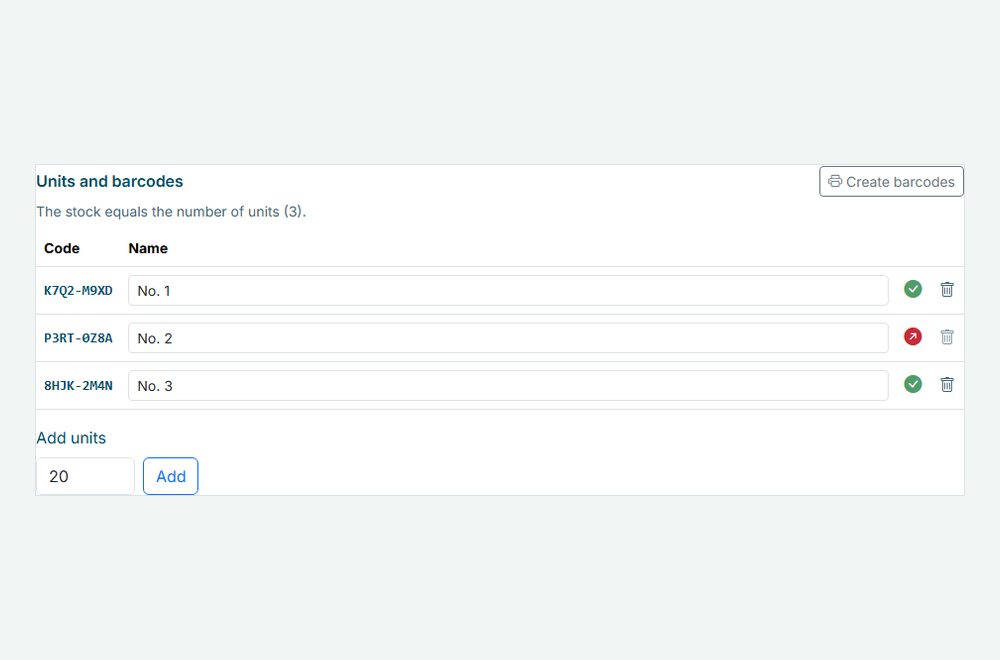
- Create units. Open a product and, below the availability calendar, enter how many physical units you have. Each unit gets a code such as K7Q2-M9XD, and you can give it a name such as no. 3. The stock now equals the number of units, see product management.
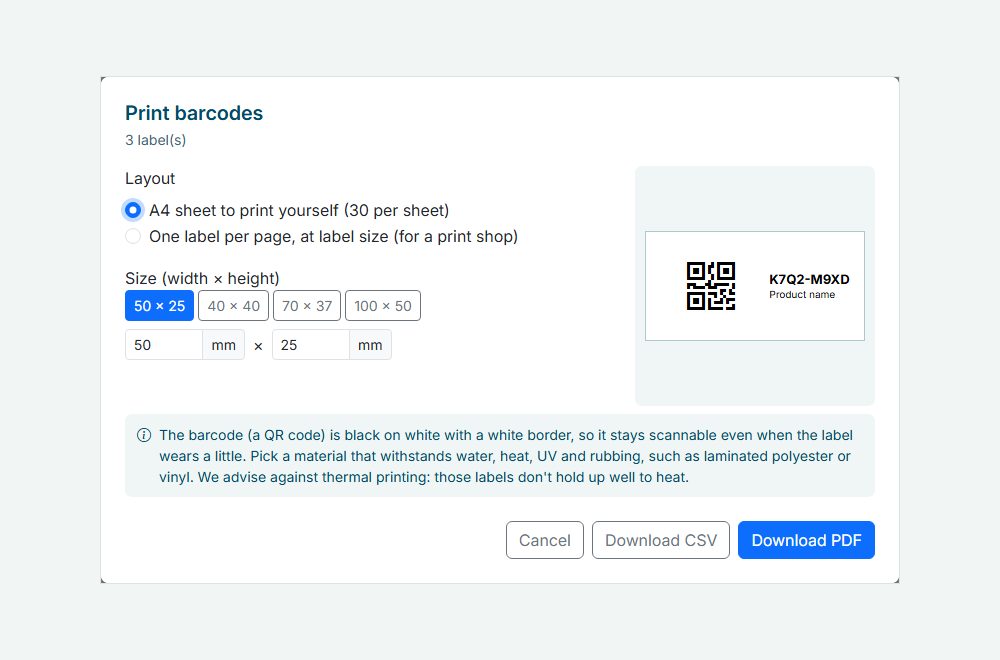
- Print the barcodes. Click Create barcodes, tick the units and click Print barcodes. Choose an A4 sheet to print yourself, or one label per page at your label size for a print shop. You also get a CSV with every code.
- Scan on the order. Open the order and scan each unit at hand-out, and again at return. Type the code, use a barcode scanner or the camera of your phone. A counter shows 2/3 scanned, and every scan is listed with a time, with Undo if you scan the wrong one.
Barcode scanning in the real world
A few ways rental businesses use it:
| Rental type | Units | What they scan |
|---|---|---|
| Bike rental | 20 e-bikes, each with a label on the frame | Hand-out and return at the shop |
| Audio and video | Speakers, mixers and microphones | Every unit that leaves the warehouse and comes back |
| Party rental | Bouncy castles and party tents | Hand-out on delivery, return on collection |
| Tool rental | Drills, saws and pressure washers | Return, so you know which unit needs a check |
See it in action
The units of a product with their barcodes and status, and the print window for the labels.
Frequently Asked Questions
Which scanner do I need?
Any barcode scanner that reads QR codes and works as a keyboard, by USB or Bluetooth. On a phone or tablet you can also use the camera, straight in your dashboard, see mobile app.
What is on the label?
A QR code with the readable code under it and the product name, black on white with a white border, so it stays scannable when the label wears. You choose the size in millimetres. Pick a material that handles water, heat and sun.
What happens to my stock?
A product with units has a stock equal to its number of units. Add or remove a unit and the stock changes with it. A unit that is handed out cannot be removed until it is back. A bundle has no units of its own: when you scan a bundle order, Be-Bookable expects the units of every part.
Can I switch barcode scanning off again?
Yes. Your units and scans are kept, and you manage the stock yourself again. Switch it on later and everything is back, with the stock set to the number of units.