Turn a fully booked product into a booking
In short
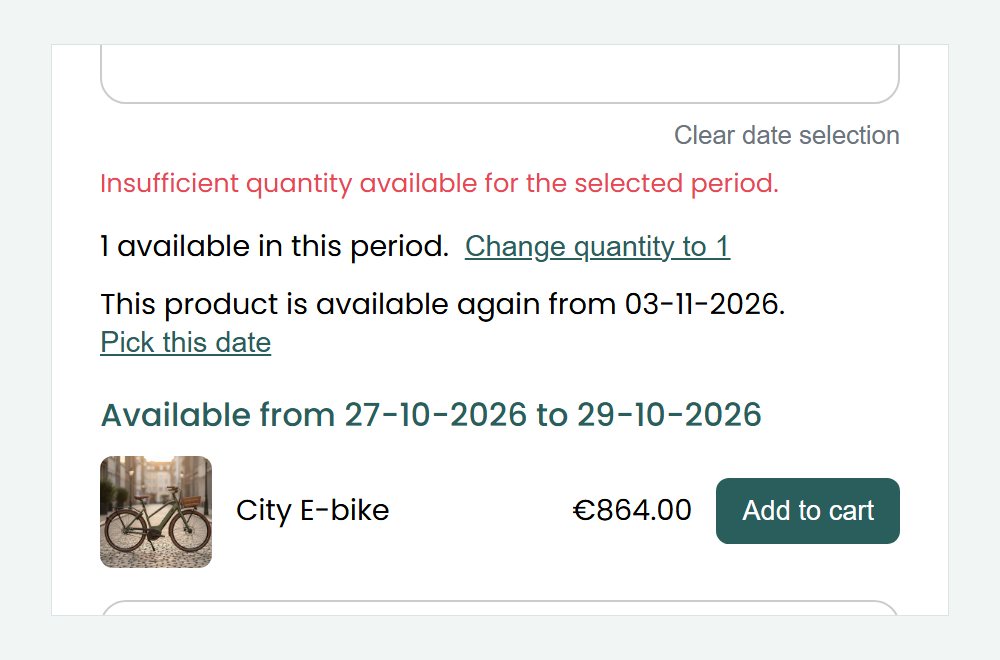
- When a customer picks a period or a quantity that is not free, the product page shows how many are still free and the next date the same rental can start.
- Below that, your shop shows the related products that are free in that period, each with its price and an Add to cart button.
- You choose the related products per product, and you can switch the list off in your shop settings.

Why alternatives matter
A customer who only sees that something is not available often leaves to look elsewhere. Showing what is free, and when, keeps them in your shop.
What is still free
Customers see how many units are free in their period, and lower the quantity with one click.
The next free date
Customers see when the same rental can start again, and pick that date with one click.
Related products that are free
The products you linked as related appear with their price, ready for the cart.
How Be-Bookable solves it
- Link related products. Open a product and add related products in the Accessories & related products panel, see related products.
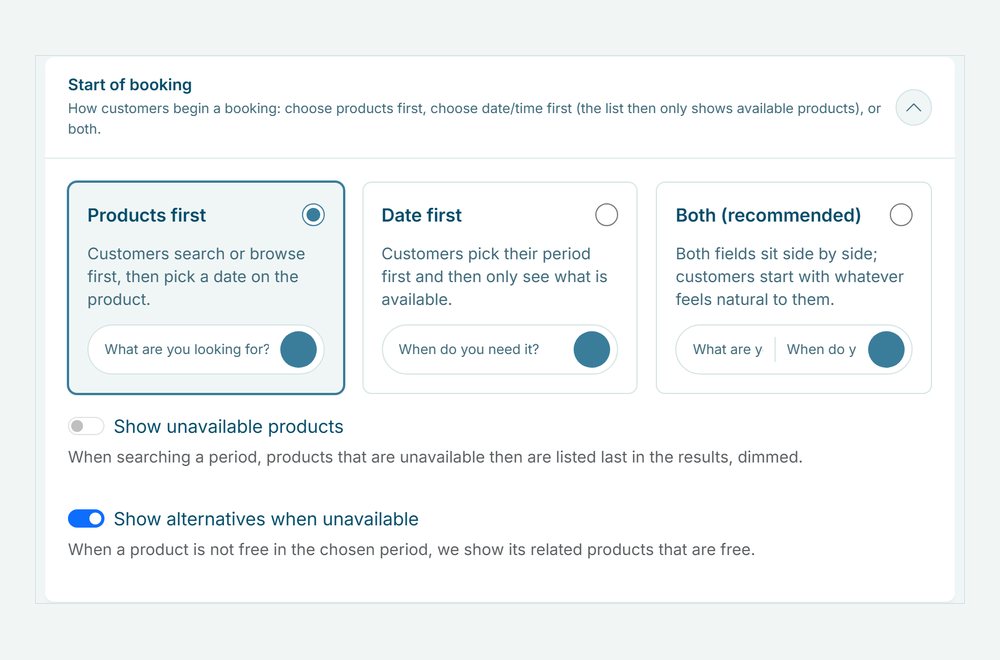
- Leave the switch on. Under Shop Settings, in the Start of booking panel, Show alternatives when unavailable is on from the start. Switch it off to hide the list of products. The free quantity and the next free date stay.
- Customers pick a period. If the product is not free for the chosen period or quantity, the product page shows how many are free, the next free date and the related products that are free in that period.
- Customers choose. They lower the quantity, pick the next free date or add a related product to the cart. If a product in the cart is no longer free, the cart shows View alternatives, which opens the product page with the same period and quantity.
Alternatives in the real world
A few examples of what customers see when a product is booked:
| Rental type | Booked product | Related products shown |
|---|---|---|
| Bike rental | E-bike | City bike, cargo bike |
| Party rental | Party tent 6×12 m | Party tent 5×10 m, stretch tent |
| Audio and video | Speaker set | Compact speaker set, two loose speakers |
| Camping gear | Family tent | Two dome tents |
Frequently Asked Questions
Which products are shown as alternatives?
Only the related products you linked to that product, and only the ones that are free in the same period. An alternative must be bookable for the same rental: per day for a day rental, per hour for an hourly rental, whole weeks for a weekly rental and a duration option of the same length. Its minimum and maximum per booking must fit too.
How far ahead does it look for the next free date?
Up to a year ahead for day and week rentals, and 60 days ahead for hourly rentals. If the quantity never fits, for example because a customer asks for more units than you have, no date is shown.
Can I switch the alternatives off?
Yes. Under Shop Settings, in the Start of booking panel, switch off Show alternatives when unavailable. The list of products then disappears. Customers still see how many are free and the next free date.
Does it work in the booking widget on my own website?
Yes. The alternatives appear on the product page in your hosted shop and in the booking widget, see website widget.