Let customers pick up without you
In short
- Customers pick up from a key safe or with a code lock, also outside your opening hours.
- Per pickup option you choose a fixed code, such as the code of your safe, or a new 6-digit code for every order.
- The customer gets the code shortly before pickup, by email and in their account, together with your explanation.

Why pickup codes matter
Customers who can only pick up during your opening hours have to plan around you. With a key safe or a code lock they pick up when it suits them, and you do not have to be there.
A code per order
Leave the fixed code empty and every order gets its own 6-digit code.
Or your fixed code
Fill in the code of your key safe. If you change it, you see which open orders still have the old code.
Sent at the right time
The code goes with the reminder before pickup, not weeks in advance.
How Be-Bookable solves it
- Switch on the pickup code. Under Integrations, open Pickup code, switch it on and choose the shipping options it belongs to, such as pickup at your shop.
- Set the code and the explanation. Per option, fill in a fixed code or leave it empty for a code per order, and write how the customer finds the safe or the lock.
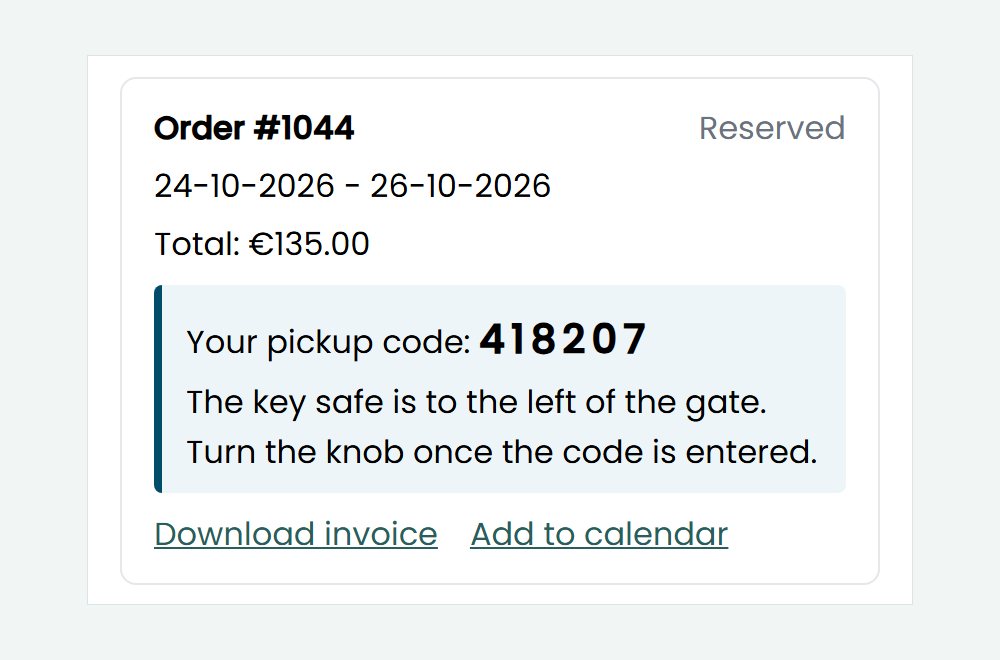
- The customer gets the code. From the day of the pickup reminder, the code is in the reminder email and with the order in the customer’s account, see reminder emails.
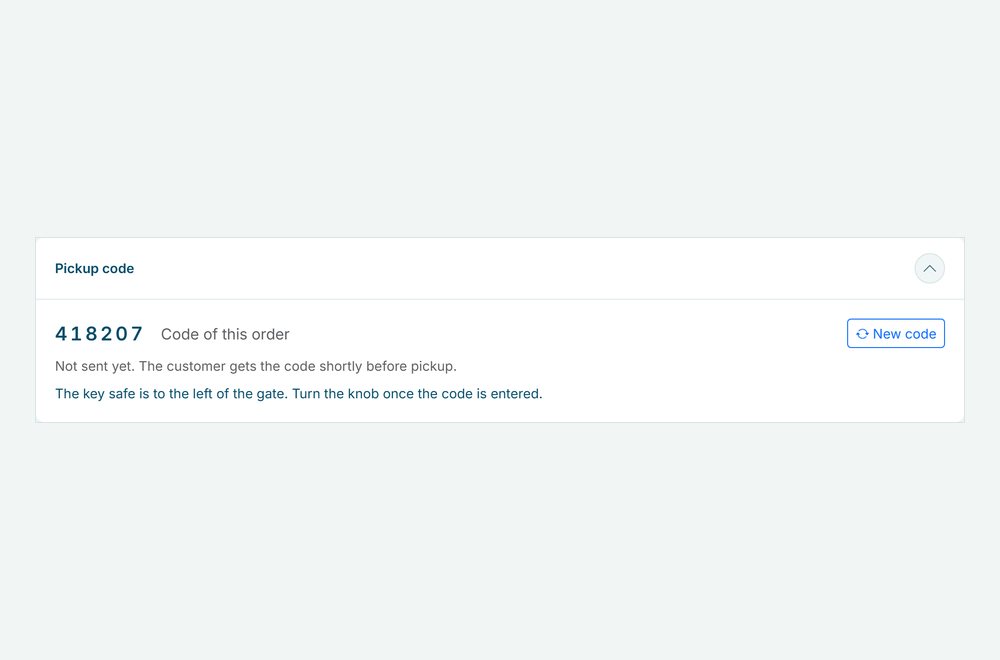
- You keep track. On the order you see the code and whether the customer already got it. With a code per order you can make a new code, which is noted on the order.
Pickup codes in the real world
How rental businesses use a code:
| Rental type | Where the items are | Which code |
|---|---|---|
| Bike rental | Bikes in a shed with a code lock | A code per order |
| SUP rental | Boards in a locker by the water | A code per order |
| Trailer rental | Keys in a key safe at the gate | The fixed code of the safe |
| Tool rental | Tools in a container on the yard | A fixed code you change now and then |
See it in action
The code in the customer’s account, and the pickup code on the order in your dashboard.
Frequently Asked Questions
When does the customer get the code?
Shortly before pickup, on the day of the pickup reminder, which you set from 1 to 7 days before. Only for a confirmed order, also when the customer pays on invoice or in cash. A booking made after that day gets the code in the next status email.
Do I need reminder emails?
It works best with them, because the reminder before pickup always contains the code. Without reminders, add %pickup_code% to a status email under Templates, see customer emails.
Does Be-Bookable open the lock?
No. You set up the key safe or the code lock yourself. With a code per order, you also set that code on your lock. Be-Bookable makes the code and sends it to the customer.
Where does the customer see the code?
In the reminder email before pickup, and from that day on with the order in their account, see customer accounts.