A rental agreement with every order
In short
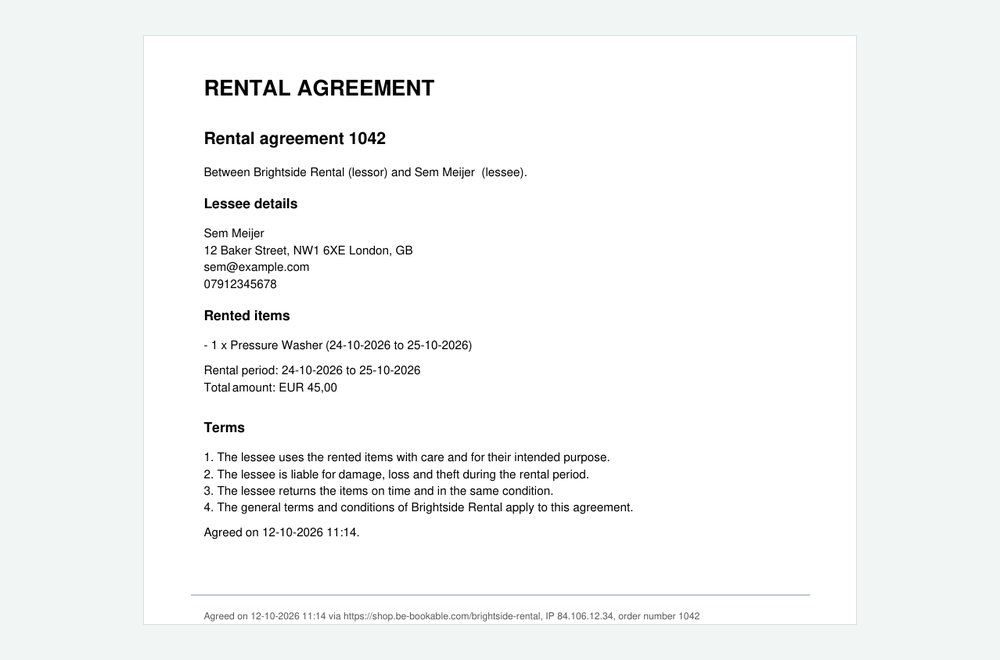
- Switch on the rental agreement and every order gets a PDF with the customer’s details, the products, the rental period, the amount and your contract terms.
- Customers agree at checkout with the terms checkbox, and can first open the agreement filled in with their cart.
- The PDF goes with the order confirmation and stays on the order, with the moment the customer agreed.

Why a rental agreement matters
For valuable items or longer rentals you want clear agreements on paper: who rents what, for how long and on which terms. Writing that for every order by hand costs time.
Your own contract text
Write your terms once per shop language, or start from the example text. Placeholders fill in the customer, products, period and amount.
Agreed at checkout
The terms checkbox also covers the rental agreement. The PDF records when, in which shop and from which IP address the customer agreed.
A new version when the order changes
Do you change products or dates on an order? The order gets a new version of the agreement, and earlier versions stay.
How Be-Bookable solves it
- Switch it on. Go to Integrations, open Rental agreement and switch on Rental agreement per order.
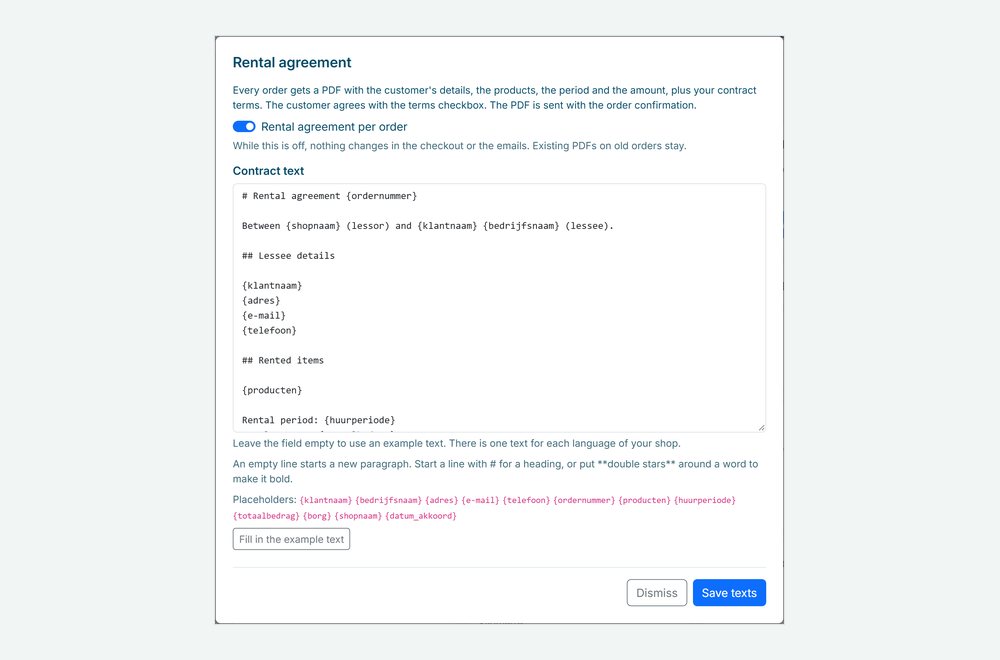
- Write your contract text. Leave the field empty to use the example text, or click Fill in the example text and adapt it. An empty line starts a paragraph, a line starting with # is a heading, and **double stars** make a word bold.
- Use placeholders. Placeholders such as {klantnaam}, {producten}, {huurperiode} and {totaalbedrag} are filled in per order, so one text fits every booking.
- Customers agree at checkout. The terms checkbox names your terms, your privacy policy and the rental agreement. The PDF goes with the order confirmation, see customer emails.
Rental agreements in the real world
Where an agreement per order helps:
| Rental type | What the agreement covers | Why it helps |
|---|---|---|
| Machine rental | Careful use, and liability for damage and theft | Clear terms before a valuable machine leaves the yard |
| Trailer rental | The rental period and returning on time | The customer agrees before paying |
| Party rental | The products, the quantities and the total amount | One document with everything that was booked |
| Boat rental | Liability and returning in the same condition | A record of what the customer agreed to |
See it in action
The agreement as a PDF with the line that shows when the customer agreed, and the contract text with its placeholders.
Frequently Asked Questions
Is this an electronic signature?
No. The customer agrees with the terms checkbox at checkout. The PDF records the moment, the shop address and the IP address of that agreement.
Can I have the agreement in more languages?
Yes. There is a contract text for each language of your shop, and the PDF follows the language of the order, see custom language settings.
What happens when I change an order?
When the change shows in the agreement, such as other products or dates, the order gets a new version of the PDF. Earlier versions stay, and so does the moment the customer agreed.
What about orders I create myself?
An order you create in your dashboard also gets the agreement, with the line To be signed at handover instead of an agreement moment.