Home / Features / Multiple locations

Multiple locations

Manage several shops with their own stock, orders and settings from one login, and give your team access per location.

Run several shops from one login

In short

  • A location is a shop of its own, with its own web address, stock, opening hours and orders. You manage all your locations with one login.
  • You switch between locations in the menu at the top of your dashboard. A new location can start with the settings of an existing one.
  • Your team members get access per location, each with a role that fits their work there. An extra location comes without an extra charge.
The dashboard on a phone: the menu shows the locations Brightside Rental, Amsterdam and Utrecht, and the owner fills in a new location in The Hague
The owner opens the menu, sees three locations and adds a fourth one with the settings of the current shop.

Why multiple locations matter

A rental company with a second branch often ends up with two accounts and two passwords, or with one shop that mixes the stock of both. Separate locations under one login keep every branch clear.

One login

Switch between your locations from the menu. Each location keeps its own products, stock, orders and settings.

A quick start

A new location can copy the branding, shipping and pickup options, opening hours, emails, pages and roles of the current shop. Products are not copied.

No extra charge

An extra location comes without an extra charge. Your team gets access per location, with a different role in each one if needed.

How Be-Bookable solves it

  1. Add a location. As the owner, open the menu at the top right and choose New location. Enter the name and the address, and choose whether to copy the settings of the current shop.
  2. Connect what you use. Every location has its own connections. If you use Mollie or Sendcloud, connect them again for the new location.
  3. Switch between locations. From the moment you have two locations, the menu lists them. The dashboard then shows the location you picked.
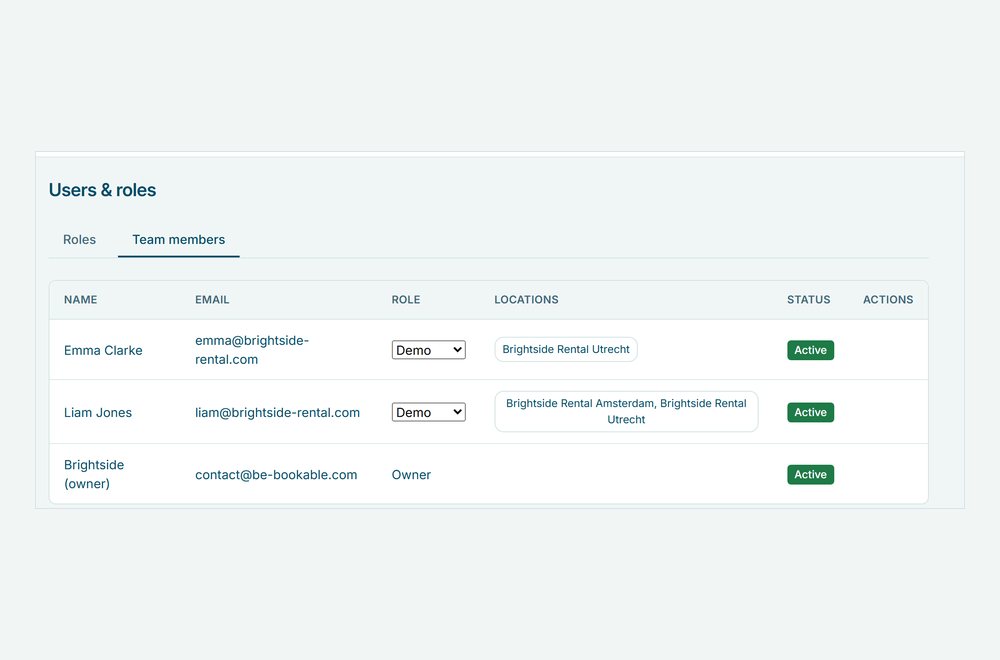
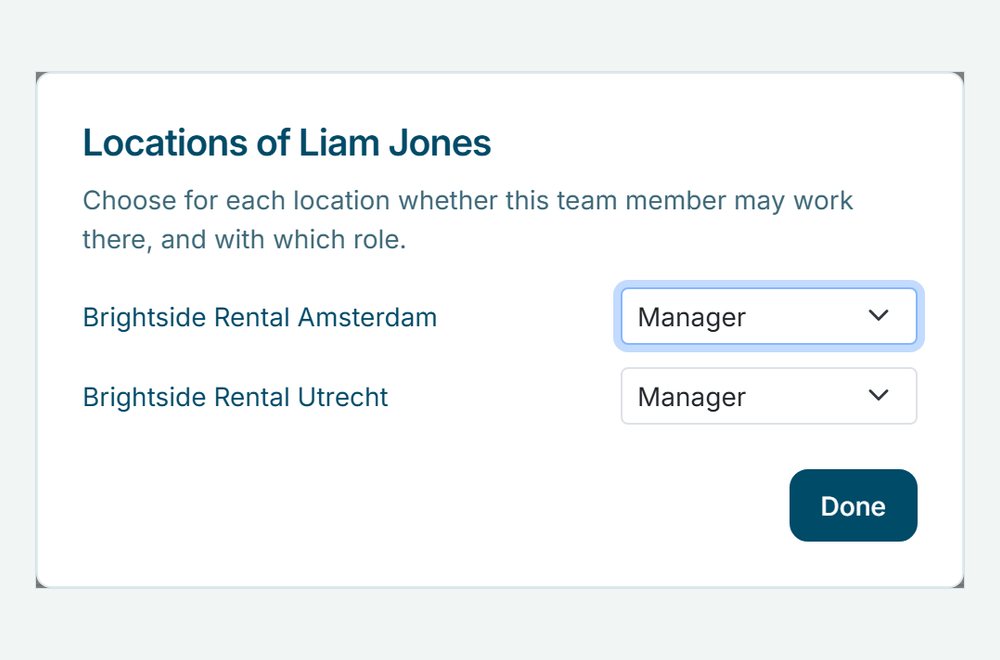
  4. Give your team access. Under Users & roles, the Team members tab gets a Locations column. Choose per location whether a team member may work there, and with which role, see users and roles.

Multiple locations in the real world

A few examples of how rental companies use locations:

Rental typeLocationsWhy separate
Bike rentalA shop in the city and one at the beachEach with its own bikes and opening hours
Party rentalTwo depots in different regionsCustomers book at the depot near them
Camper rentalA second branch across the borderIts own web address and its own prices
Boat rentalA summer location next to the main shopIts own season and its own team

See it in action

The locations in the menu, and access per location for your team.

Frequently Asked Questions

Do locations share stock?

No. Every location is a shop of its own, with its own products, stock and orders. A product you rent out in two locations exists once in each location.

If you choose to copy the settings: branding, shipping and pickup options, opening hours, emails, pages and roles. Products and orders are not copied, and connections such as Mollie or Sendcloud are set up per location.

Only the owner of the account. Team members see the locations they have access to in the menu, and switch between them in the same way.

Yes. Notifications about new orders come from every location you have access to, with the name of the shop in the message.

Other Features

Alternatives when booked

When a product is booked, your shop shows how many are free, the next free date and related products that are free in that period.

Barcode scanning

A barcode per unit, printed as labels and scanned at hand-out and return, so you know which unit is with which customer.

A calendar with a cross icon representing a booking block

Booking blocks

Hold prep, cleaning or transport time before and after every rental, set per product.

Booking requests

Customers send a request without paying. You check it, adjust the order and send a quote that they accept and pay.

Bundles

Combine products into one bookable set with its own price, while stock stays correct for every item.

A set of icons representing category management

Category management

Group your products into categories with a photo and description, so customers find what they need faster.

Custom shipping options truck

Custom shipping options

Set your own pickup and delivery options, each with a fixed price, and let customers choose at checkout.

Customer accounts

Customers log in with a code by email, find their details filled in at checkout and see their orders with invoices. Guests can still book.

An enveloppe representing a customer email

Customer emails

Send customers an email at every order status, in your own words, with the order summary added for you.

A card representing a customer page

Customer pages

Your terms, privacy policy and thank-you page, shown at checkout and after every booking.

Deposits

Ask a deposit per shop or per product, collect it as a card hold, online or at pickup, and settle it from the order.

Flexible booking slots

Rent out any product by the minute, hour, day or week, each with its own flat price and automatic buffer times.

Handover and return

Record on your phone what goes out and comes back, with photos, damage notes and the customer’s signature, as a PDF receipt on the order.

Invoice generation

Every order gets a PDF invoice in your shop’s language, attached to the order emails.

Mobile app

Add Be-Bookable to your phone and get a notification for every new order and payment.

Configure your own rental software for
Event Equipment. Tools. Office Furniture. Electronics. Gadgets. Party Supplies. Fitness Equipment. Costumes. Outdoor Gear. Baby Gear. Photography. Home Appliances. Medical Equipment. Garden Equipment. Audio Equipment. Kitchen Appliances. Water Sports Gear. Virtual Reality.  Camping Gear. Board Games. Musical Instruments. DIY Tools. Sports Equipment. Projectors. Camping Tents. Power Tools. Luxury Watches. Educational Toys. Party Tents. Office Technology. Tailoring Equipment. Karaoke Systems. Beach Equipment. Pop-up Shops. Massage Chairs. Ski Gear. Fishing Equipment. Project Tools. 3D Printers. Robotics Kits. Air Purifiers. E-bikes. Gaming Consoles. VR Headsets. Learning Kits. Silent disco.