Home / Features / Handover and return

Handover and return

Record on your phone what goes out and comes back, with photos, damage notes and the customer's signature, as a PDF receipt on the order.

Record what goes out and what comes back

In short

  • Record on your phone what the customer takes and brings back: the items, any damage, photos and the customer’s signature.
  • Every handover and return becomes a PDF receipt on the order. The customer gets it by email when you choose so.
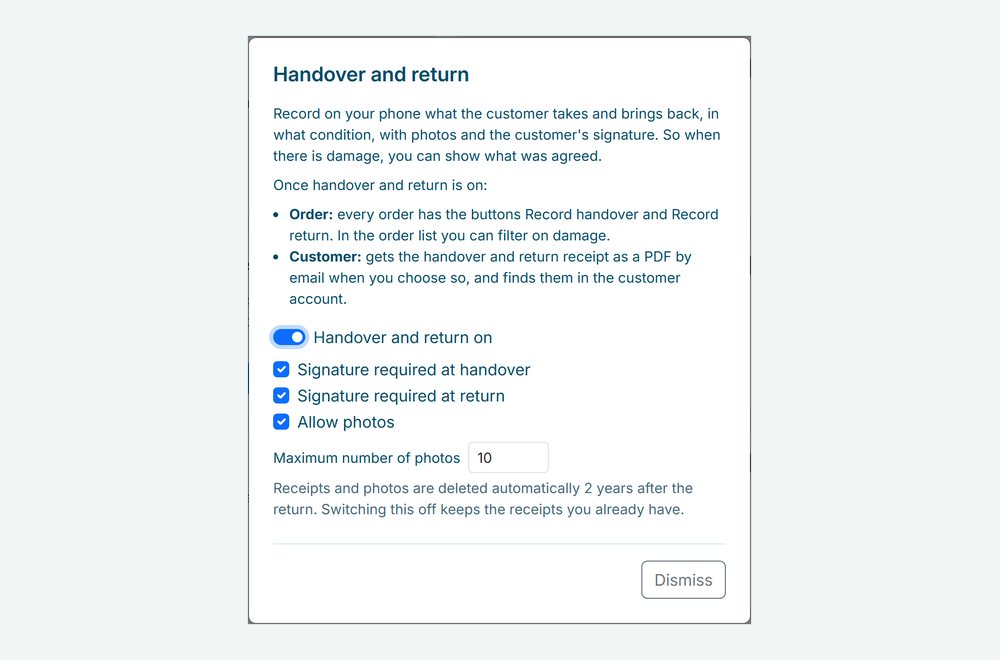
  • Switch it on under Integrations and choose when a signature is required and how many photos you allow.
The order page on a phone: Record return opens, the pressure washer is ticked, Damage found is noted, two photos are added, the customer signs, and the return appears with a Damage label
A return on the phone: the item is ticked, the damage is noted, two photos are added, the customer signs and the return shows up with a Damage label.

Why handover and return records matter

When something comes back damaged, it is your word against the customer’s. A receipt with photos and a signature shows what went out, what came back and in what condition.

Photos and a signature

Take photos with the phone camera and let the customer sign on the screen with a finger. You choose when a signature is required.

Damage on record

At the return, tick Damage found and describe it. The order gets a Damage label, and you can filter your order list on it.

A receipt for both of you

The handover and return receipts are PDFs with the items, remarks, photos and signature, kept with the order.

How Be-Bookable solves it

  1. Switch it on. Go to Integrations, open Handover and return and switch it on. Choose whether a signature is required at handover and at return, and whether photos are allowed and how many, up to 20.
  2. Record the handover. Open the order and tap Record handover. Tick what goes out, or tap Tick all, add remarks and photos, and let the customer sign.
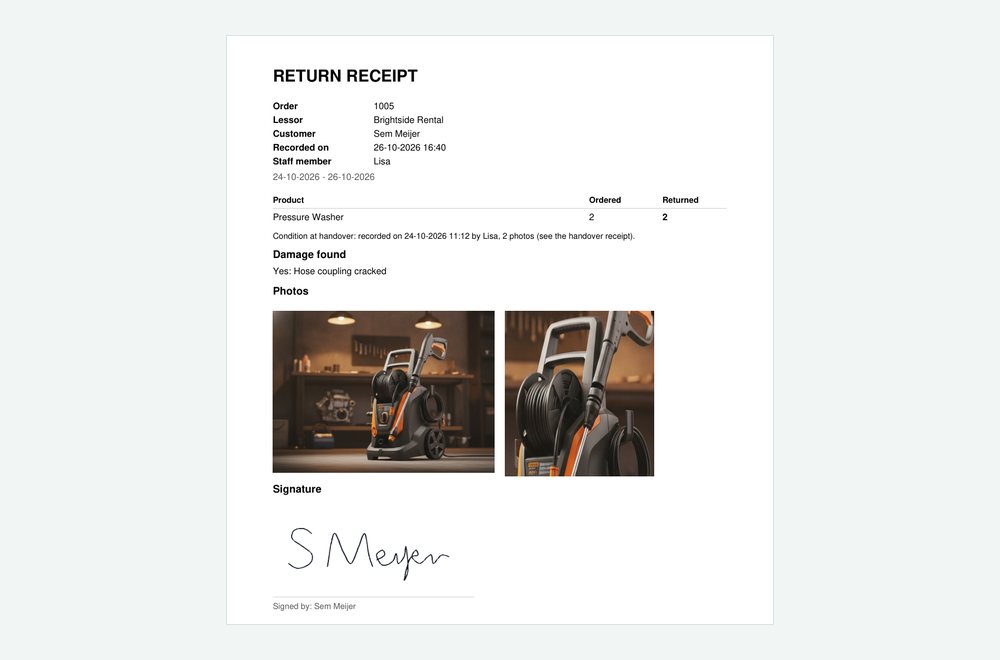
  3. Record the return. Tap Record return and tick what came back. Found damage? Tick Damage found and describe it. The return receipt also mentions how the items were at handover.
  4. Choose who gets the receipt. When you save, you choose whether the customer gets the receipt by email. It is on the order either way, and customers with an account find it there too, see customer accounts.

Handover and return in the real world

What rental businesses record:

Rental typeAt handoverAt return
Bike rentalA photo of the frame and the lock, and a signatureA scratch or a flat tyre, with a photo
Tool rentalThe machine and its accessories ticked offA missing accessory or damage, on record
Party rentalThe number of tables and chairs countedFewer chairs back, or a torn cover
Camera rentalThe serial number and the condition of the lens in the remarksA signature that everything came back

See it in action

The return receipt as a PDF, and the settings behind the Handover and return card.

Frequently Asked Questions

Does the customer have to sign?

Only when you want that. You choose whether a signature is required at handover and at return. Without a signature, the receipt says it was not signed.

Two years after the return, then they are deleted automatically. When you switch the feature off, the receipts you already have stay.

The screen keeps what you entered and sends it again as soon as you are back online. Photos are made smaller on the phone first, so they go up quickly.

No. Recording a handover or a return is separate from the order status. You change the status as before.

Other Features

Alternatives when booked

When a product is booked, your shop shows how many are free, the next free date and related products that are free in that period.

Barcode scanning

A barcode per unit, printed as labels and scanned at hand-out and return, so you know which unit is with which customer.

A calendar with a cross icon representing a booking block

Booking blocks

Hold prep, cleaning or transport time before and after every rental, set per product.

Booking requests

Customers send a request without paying. You check it, adjust the order and send a quote that they accept and pay.

Bundles

Combine products into one bookable set with its own price, while stock stays correct for every item.

A set of icons representing category management

Category management

Group your products into categories with a photo and description, so customers find what they need faster.

Custom shipping options truck

Custom shipping options

Set your own pickup and delivery options, each with a fixed price, and let customers choose at checkout.

Customer accounts

Customers log in with a code by email, find their details filled in at checkout and see their orders with invoices. Guests can still book.

An enveloppe representing a customer email

Customer emails

Send customers an email at every order status, in your own words, with the order summary added for you.

A card representing a customer page

Customer pages

Your terms, privacy policy and thank-you page, shown at checkout and after every booking.

Deposits

Ask a deposit per shop or per product, collect it as a card hold, online or at pickup, and settle it from the order.

Flexible booking slots

Rent out any product by the minute, hour, day or week, each with its own flat price and automatic buffer times.

Handover and return

Record on your phone what goes out and comes back, with photos, damage notes and the customer’s signature, as a PDF receipt on the order.

Invoice generation

Every order gets a PDF invoice in your shop’s language, attached to the order emails.

Mobile app

Add Be-Bookable to your phone and get a notification for every new order and payment.

Configure your own rental software for
Event Equipment. Tools. Office Furniture. Electronics. Gadgets. Party Supplies. Fitness Equipment. Costumes. Outdoor Gear. Baby Gear. Photography. Home Appliances. Medical Equipment. Garden Equipment. Audio Equipment. Kitchen Appliances. Water Sports Gear. Virtual Reality.  Camping Gear. Board Games. Musical Instruments. DIY Tools. Sports Equipment. Projectors. Camping Tents. Power Tools. Luxury Watches. Educational Toys. Party Tents. Office Technology. Tailoring Equipment. Karaoke Systems. Beach Equipment. Pop-up Shops. Massage Chairs. Ski Gear. Fishing Equipment. Project Tools. 3D Printers. Robotics Kits. Air Purifiers. E-bikes. Gaming Consoles. VR Headsets. Learning Kits. Silent disco.