Home / Features / Reports

Reports

Revenue, orders, returning customers and your best sellers, compared with last year.

See how your rental business is doing, at a glance

In short

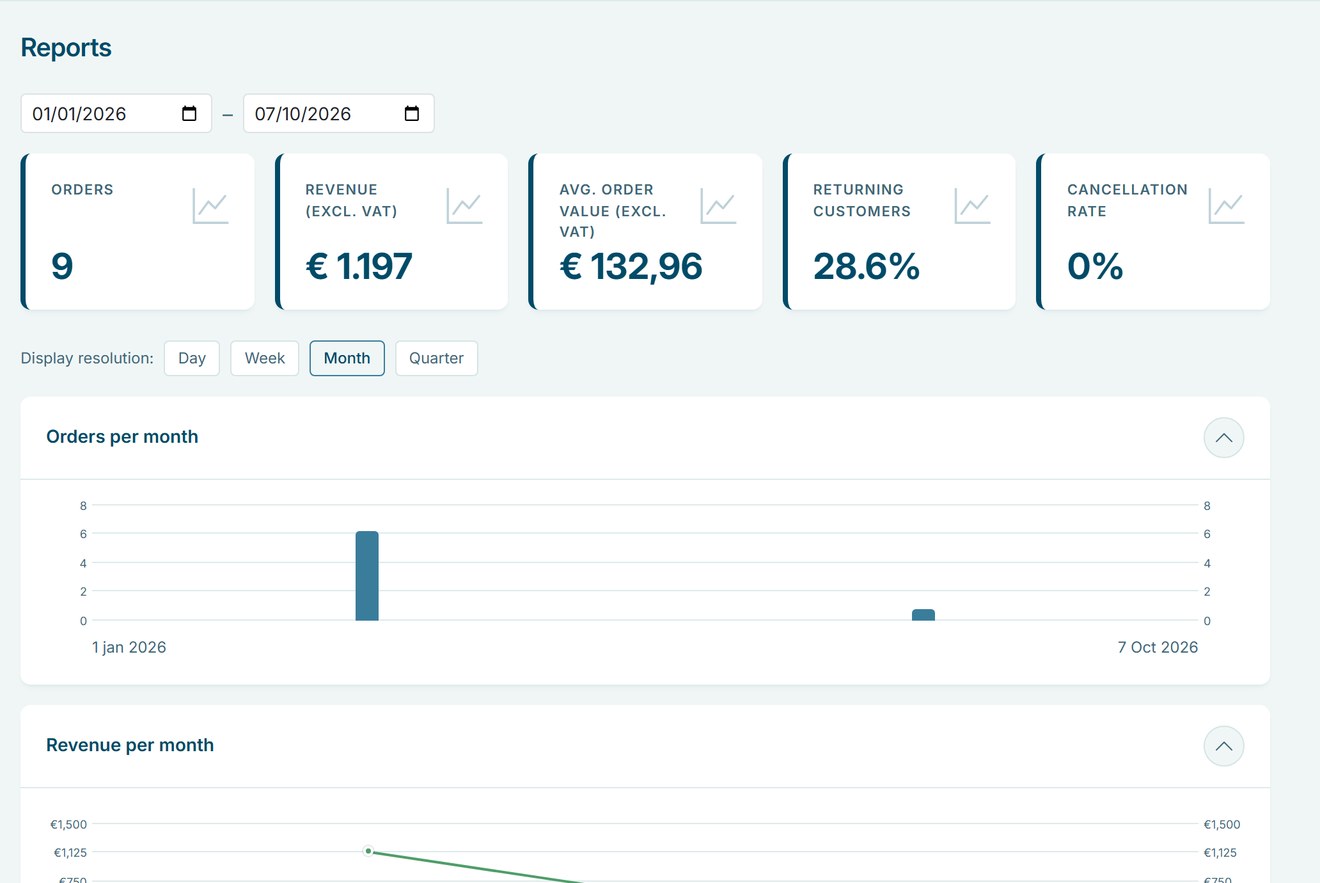
  • Revenue excluding VAT, orders, average order value, returning customers and cancellation rate.
  • Compare any period with the same period last year.
  • View by day, week, month or quarter, with the exact figures in a table.
Reports
Switch from months to weeks and scroll to your most rented products.

Why reports matter

Good decisions about stock, prices and staff start with knowing what sells and when.

Know your numbers

Revenue, orders and average order value are up to date whenever you open the page.

Spot trends

Compare with last year and see per week or month where you grow.

Know your best sellers

The top 10 shows which products are rented most.

How Be-Bookable solves it

  1. Open Reports. In your dashboard, click Reports in the sidebar.
  2. Choose a period. Pick a start and an end date. Every key figure is compared with the same period one year earlier.
  3. Pick a resolution. Show the charts by day, week, month or quarter. The table below lists the exact figures per period.
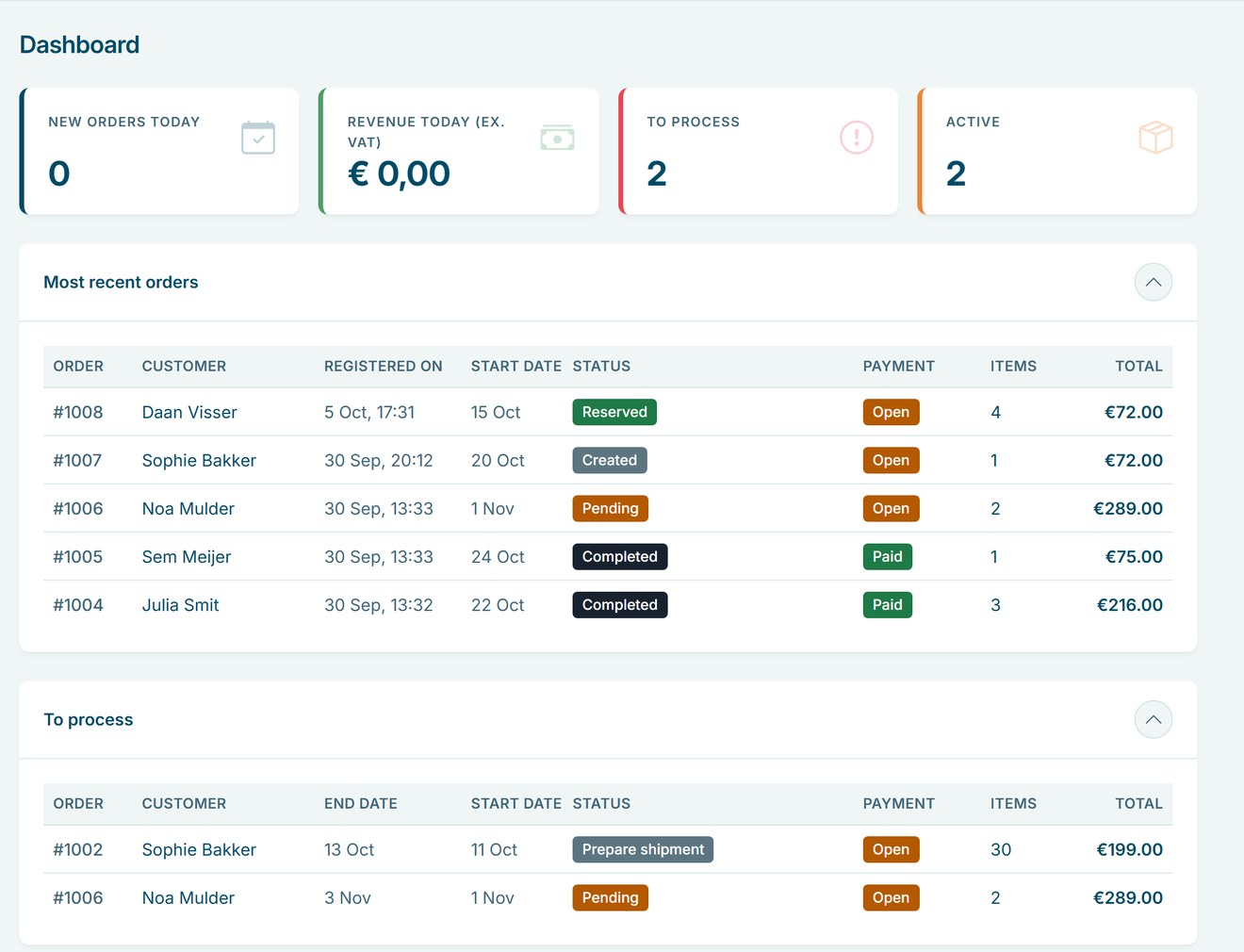
  4. Check your day. The Dashboard shows today’s new orders and revenue, the orders that need processing and the rentals that are active, all linked to your orders.

Reports in the real world

A few questions rental businesses answer with their reports:

QuestionWhere to lookWhat it tells you
Busier than last year?Revenue and ordersThe change compared with the same period last year
What to stock more of?Most rented productsYour top 10 for the period
Do customers return?Returning customersThe share of customers who booked before
Many cancellations?Cancellation rateWhether to look at your terms or deposits
Value per booking?Average order valueWhether bundles and extras pay off

See it in action

Your key figures and charts on the Reports page, and today’s work on the Dashboard.

Frequently Asked Questions

Which orders count towards revenue?

Revenue is excluding VAT and leaves out cancelled orders. All figures are grouped by the date the order was placed.

Not yet. The table shows the exact figures per period, which you can copy.

Only if their role has access to Reports. As the owner, you decide this per role under Users & roles.

No. Reports cover your orders and customers, not visits to your shop.

Other Features

A calendar with a cross icon representing a booking block

Booking blocks

Hold prep, cleaning or transport time before and after every rental, set per product.

Bundles

Combine products into one bookable set with its own price, while stock stays correct for every item.

A set of icons representing category management

Category management

Group your products into categories with a photo and description, so customers find what they need faster.

Custom language settings

Your shop appears in Dutch, English or German based on your business country, and your team picks English or Dutch for the dashboard.

Custom shipping options truck

Custom shipping options

Set your own pickup and delivery options, each with a fixed price, and let customers choose at checkout.

An enveloppe representing a customer email

Customer emails

Send customers an email at every order status, in your own words, with the order summary added for you.

A card representing a customer page

Customer pages

Your terms, privacy policy and thank-you page, shown at checkout and after every booking.

Flexible booking slots

Rent out any product by the minute, hour, day or week, each with its own flat price and automatic buffer times.

Opening & closing times

Set opening hours per weekday and closure periods for holidays, so customers only book pickups and returns when you are open.

A screen representing order management

Order management

Manage every rental order in a table, a calendar or a workflow board, and change dates, products and status as plans change.

a squared box representing product management

Product management

Manage every rental item in one place, with photos, rental prices from minutes to weeks, stock and booking rules.

Quotes

Turn a prepared order into a quote by email, with your own text and the full order summary.

Recommended accessories icon

Recommend accessories

Suggest the right accessories on every product page, optional or required, so customers book a complete set in one go.

Related products

Related products

Suggest other products on every product page, so customers find more of your range.

Reports

Revenue, orders, returning customers and your best sellers, compared with last year.

Configure your own rental software for
Event Equipment. Tools. Office Furniture. Electronics. Gadgets. Party Supplies. Fitness Equipment. Costumes. Outdoor Gear. Baby Gear. Photography. Home Appliances. Medical Equipment. Garden Equipment. Audio Equipment. Kitchen Appliances. Water Sports Gear. Virtual Reality.  Camping Gear. Board Games. Musical Instruments. DIY Tools. Sports Equipment. Projectors. Camping Tents. Power Tools. Luxury Watches. Educational Toys. Party Tents. Office Technology. Tailoring Equipment. Karaoke Systems. Beach Equipment. Pop-up Shops. Massage Chairs. Ski Gear. Fishing Equipment. Project Tools. 3D Printers. Robotics Kits. Air Purifiers. E-bikes. Gaming Consoles. VR Headsets. Learning Kits. Silent disco.